
Reset Your Printer. Get Back to Printing.
A reliable Epson waste ink pad counter reset solution for Windows and macOS.
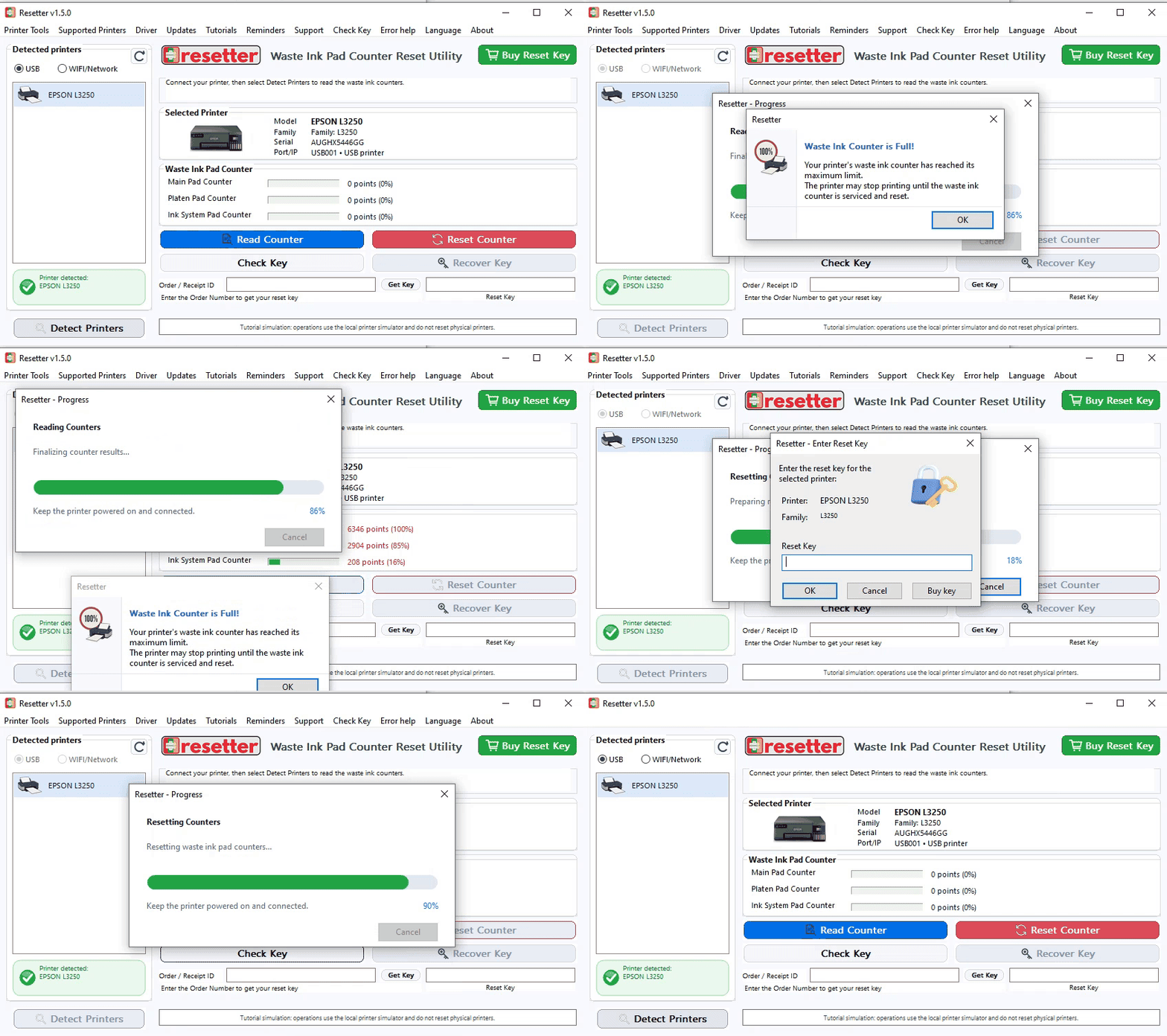
Reset in 3 Easy Steps
1. Download
2. Read Counter
3. Reset Counter
Why Choose Resetter?
Easy to Use
Simple and intuitive interface
Secure
Protected key validation
Wide Compatibility
Supported Epson models
USB & Network
Flexible connectivity
Free Counter Check
Read before you reset
Customer Support
Get assistance when needed
Signed Windows App
Digitally signed Windows application
Signed macOS App
Digitally signed and notarized
Watch How Resetter Works
See how easy it is to read and reset your printer.
Find Your Printer Model
Check compatibility before purchasing a reset key.
Common Printer Errors
SERVICE REQUIRED –
A printer’s ink pad is at the end
of its service life
The ink pad needs service
A part inside your printer is at
the end of its service life
A printer’s ink pad is nearing
the end of its service life
The ink pad is nearing the end
of service life
Cannot run borderless printing
until the part is replaced
The printer’s borderless printing
ink pad has reached the end of its
service life. It is not a
user-replaceable part.
Physical waste ink pad maintenance may also be required. Resetting the counter does not clean or replace the waste ink pads.
Frequently Asked Questions
Is Resetter free to download?
Yes. Resetter is free to download.
You can check your printer’s waste ink
pad counter for free. A valid reset key
is required to reset the counter.
What is a reset key?
A reset key is a unique authorization
code used to reset the waste ink pad
counter of a supported printer.
Does Resetter support my printer?
Resetter supports a wide range of
Epson printer models. Please check
the supported printer list before
purchasing a reset key.
Can I reset my printer using a Mac?
Yes. Resetter is available for
compatible macOS computers and
supported printer models.
Can I reset my printer online?
Yes. Online Reset is available for
selected printer models. Visit
Online Reset
to check compatibility and get started.
Do I need to replace the waste ink pads?
Resetting the waste ink pad counter
does not physically clean or replace
the waste ink pads. Proper maintenance
is recommended to prevent ink overflow
and potential printer damage.
Ready to Reset Your Printer?
Get back to printing with Resetter.